





Epson C13T736200 Printer Maintenance Kit | SureColor
$47.25
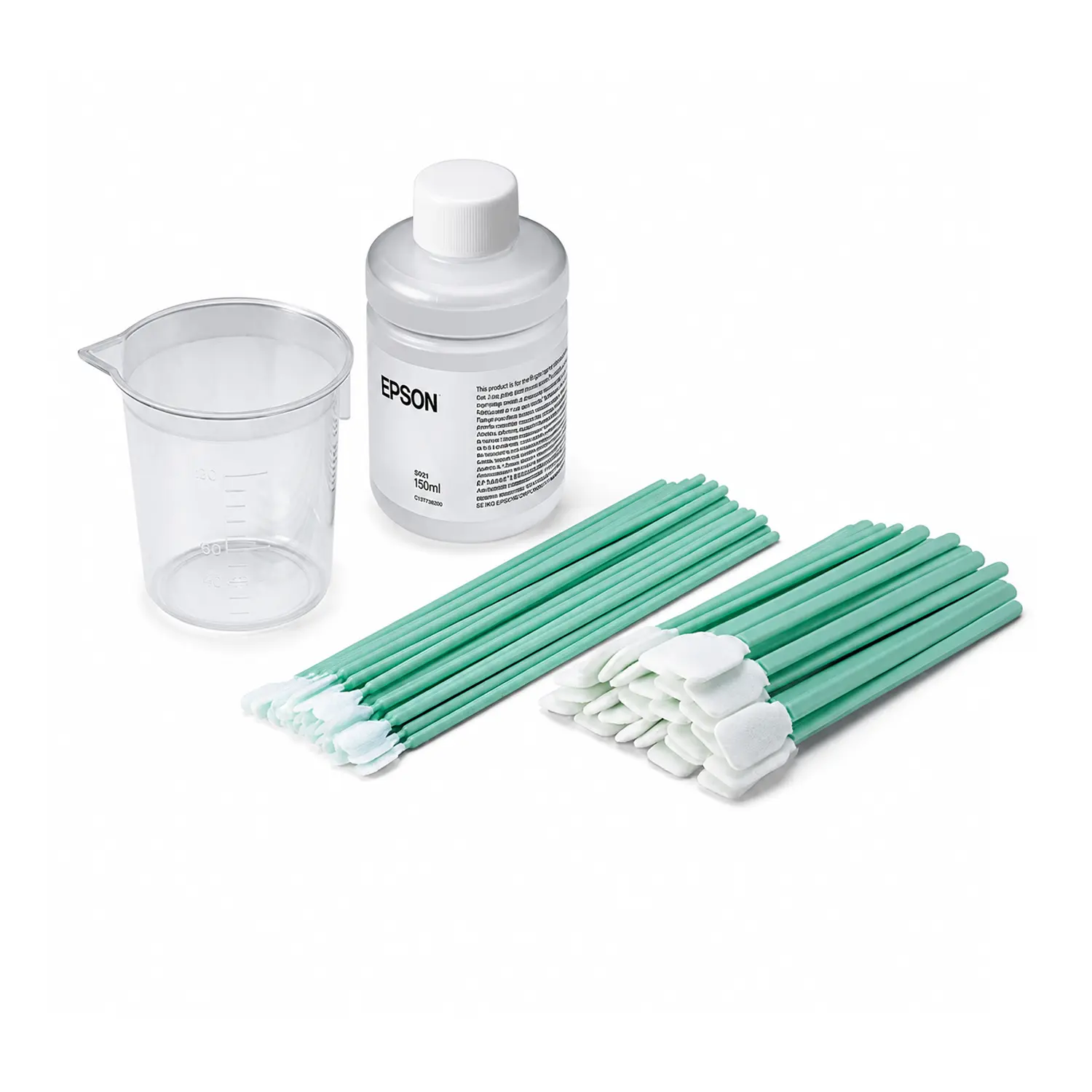
- What’s Included: Cleaning liquid, cup, four gloves and 50 cleaning sticks
- Compatible Printers: SureColor F1070, F2000, F2100, F2270, G6070 and G9070
- Primary Uses: Cleans approved areas around the print head and suction cap
- Genuine Epson Part: OEM C13T736200 kit made for routine printer maintenance
- Important: Not a head cleaning set, maintenance box or cleaning ink pack
Epson C13T736200 Printer Maintenance Kit for SureColor
Epson C13T736200 Printer Maintenance Kit gives print shops the genuine cleaning tools required for approved manual maintenance on compatible Epson SureColor DTG and DTFilm printers. It helps operators remove dried ink, fibers and debris from designated areas around the print head and suction cap.
Regular cleaning supports reliable suction, effective cleaning cycles and consistent output. Epson recommends using only the specified kit components and keeping a spare kit available so maintenance does not interrupt production.
What’s Included in the Epson C13T736200 Kit?
Each order contains one genuine Epson C13T736200 Printer Maintenance Kit. The current Epson kit configuration includes the following manual-cleaning supplies:
- Protective Gloves: Four gloves
- Wide Cleaning Sticks: 25 pieces
- Narrow Cleaning Sticks: 25 pieces
- Cleaning Liquid: One bottle
- Plastic Cup: One cup
Epson’s older documentation may call the sticks medium-tip and small-tip swabs. Newer manuals describe them as wide and narrow cleaning sticks. These names refer to the two cleaning-tool sizes supplied in the kit.
Compatible Epson SureColor Printers
Epson documentation identifies C13T736200 for multiple generations of garment-decoration printers. Confirmed models include the SureColor F1070, F2000, F2100, SureColor F2270, SureColor G6070 and SureColor G9070.
This broad compatibility makes the kit useful for shops operating both current and legacy Epson production systems. Always follow the maintenance instructions for your exact printer model because cleaning locations and control-panel steps can differ.
Designed for Print-Head and Suction-Cap Maintenance
Ink and garment fibers can collect around print-head edges and cap surfaces during production. If buildup remains, it can reduce cap suction, contribute to ineffective cleaning cycles and cause ink droplets or smudges on finished work.
The included cleaning liquid and sticks are used only on Epson-approved maintenance areas. Follow the printer screen or model-specific user guide, use a fresh stick when required and avoid touching the nozzle surface.
How the Two Cleaning-Stick Sizes Are Used
The wide and narrow sticks help operators reach different maintenance areas without substituting lint-producing cotton swabs or sharp tools. Epson warns that unsuitable cleaning sticks can damage the print head or leave fibers behind.
Pour only the instructed amount of cleaner into the supplied cup. Dampen the appropriate stick without allowing excess liquid to drip, and discard used cleaner and tools according to local requirements.
C13T736200 Is Not a Replacement Parts Kit
This printer maintenance kit supplies cleaning tools and liquid. It does not contain a wiper unit, flushing pad, anti-drying cap, capping station, maintenance box, waste ink bottle or replacement print head.
It is also different from the cleaning ink packs used for printer-mode changes or long-term storage. Match the part number shown by the printer or Epson manual before ordering to avoid delaying maintenance.
Epson C13T736200 Specifications
- Brand: Epson
- MPN: C13T736200
- GTIN-12: 010343905054
- Supply Type: Maintenance kit
- Package Quantity: One kit
- Cleaning Sticks: 50 total
- Printer Types: DTG and DTFilm
- Condition: Genuine Epson OEM
Safe Handling for Production Environments
Wear protective eyewear, gloves and a mask during maintenance. Keep the cleaner away from children, do not drink it and follow Epson’s first-aid and disposal guidance if contact or a spill occurs.
Close the cleaner securely after use and store it at room temperature away from direct sunlight. If opened cleaner changes color or develops an unusual odor, Epson directs users to stop using it and open a new kit.
Order Genuine Epson Maintenance Supplies
Choose C13T736200 when your compatible SureColor printer requires the genuine manual cleaning kit. Browse additional Epson accessories for model-specific maintenance parts and production supplies.
Add a spare kit to your maintenance inventory before the current cleaner or sticks run out. Order from Buffalo Imaging to keep approved Epson cleaning tools ready for scheduled or as-needed service.
What is the Epson C13T736200 Printer Maintenance Kit?
The Epson C13T736200 Printer Maintenance Kit is a genuine manual-cleaning kit for compatible SureColor DTG and DTFilm printers. It provides Epson-approved cleaning liquid, two cleaning-stick sizes, gloves and a cup for cleaning designated areas around the print head and suction cap.
What is included with Epson C13T736200?
Epson documentation identifies C13T736200 for the SureColor F1070, F2000, F2100, F2270, G6070 and G9070. Follow the maintenance instructions for your exact printer because procedures and cleaning locations can differ by model.
What is the C13T736200 maintenance kit used for?
The kit is used for Epson-approved manual cleaning around the print head, suction cap and related maintenance areas. It helps remove ink buildup, fibers and debris that can interfere with suction, cleaning performance or print quality.
How many cleaning sticks are included?
The current Epson kit configuration includes 50 cleaning sticks: 25 wide sticks and 25 narrow sticks. Older Epson documents may describe these as medium-tip and small-tip swabs.
Does the Epson C13T736200 kit include cleaning liquid?
Yes. One bottle of Epson cleaning liquid, also called ink cleaner in newer manuals, is included along with a plastic cup. Use it only on the areas and in the amount specified by the printer screen or Epson manual.
Is C13T736200 a print-head cleaning kit?
No. C13T736200 is a manual cleaning-tool kit. It does not include model-specific replacement parts such as a wiper unit, flushing pad, anti-drying cap, capping station or print head.
Is C13T736200 a maintenance box or waste ink bottle?
No. A maintenance box or waste ink bottle collects used ink and is a separate consumable. C13T736200 contains cleaner, cleaning sticks, gloves and a cup for manual printer maintenance.
Can C13T736200 be used for printer storage preparation?
This kit can be used to clean approved areas before certain maintenance procedures, but it does not replace the cleaning ink packs required for mode changes or long-term storage. Follow the printer display and order the separate cleaning pack specified for your model.
Can I use cotton swabs or household cleaner instead?
Epson recommends using only the supplied or specified cleaning sticks and designated cleaner. Lint-producing swabs, water, alcohol, harsh chemicals or sharp tools can damage printer parts or reduce print quality.
When should I replace an opened maintenance kit?
Keep the cleaning-liquid bottle tightly closed and store it at room temperature away from direct sunlight. Epson says to stop using opened cleaner and replace the kit if the liquid changes color or develops an unusual odor.
Does a maintenance kit come with a new Epson printer?
Epson says one maintenance kit is included with applicable printers and recommends keeping a spare available. This product page is for one replacement C13T736200 kit only; the printer and other maintenance parts are not included.
What are the UPC, weight and dimensions for Epson C13T736200?
The UPC is 010343905054. Buffalo Imaging currently lists the package at 0.8 lb with dimensions of 2.9 × 6.8 × 6.9 inches. Confirm against the physical package when exact shipping measurements are required.
| Brand | Epson |
|---|---|
| Printer Model | Epson SureColor F1070, Epson SureColor F2000, Epson SureColor F2100, Epson SureColor F2200, Epson SureColor F2270, Epson SureColor G6070, Epson SureColor G9070 |
| Weight | 0.8 lbs |
| Dimensions | 2.9 × 6.8 × 6.9 in |
Add a review
Epson C13T736200 Printer Maintenance Kit | SureColor Your review
* Review is required
Name
* Name is required
Email
* Email is required
Reviews
There are no reviews yet