





DNP DS620A Complete Bundle — Printer, 4 x 6 Media Kit & WCM Wireless Module
Original price was: $1,499.00.$1,349.99Current price is: $1,349.99.
In Stock - Commerce, CA
- Bundle Includes: DS620A printer + 4 x 6 media kit (800 prints) + WCM-PLUS.
Three matched components — ready to print day one, no extra shopping needed. - Print Speed: 400 prints/hr — 8.3 sec per 4 x 6 in, dry and ready to hand out.
Strips, 4 x 6 in, 5 x 7 in, 6 x 8 in — all from one roll, driver cut modes. - Wireless: WCM-PLUS dual-band Wi-Fi — AirPrint from iPhone/iPad, no app needed.
Own hotspot, no venue Wi-Fi required — 3 USB ports, up to 3 DNP printers. - Print Quality: Dye sublimation — glossy or matte from same roll, overcoat included.
Dry, smudge-proof output — no wait time, no handling damage at live events. - Warranty: 1-Year standard — 26 lbs, 10.8 x 14.4 x 6.7 in, front-load media.
Same-day shipping before 2 PM PST — free shipping on orders over $149.
DNP DS620A Complete Bundle — Printer, 4 x 6 Media Kit & WCM Wireless Module
The DNP DS620A bundle brings together three components that photo booth operators, event photographers, and studio professionals need from day one: the DNP DS620A Professional Dye Sublimation Photo Printer, a DNP DS620A 4 x 6 media kit with 800 prints, and the DNP WCM-PLUS Wireless Connect Module. Everything ships together, pre-matched, so you can start printing at your first event without hunting down supplies or accessories separately.
Quick links
What’s in the bundle · DS620A printer · WCM-PLUS wireless module · Media kit · Best uses · Specifications
What’s in the bundle
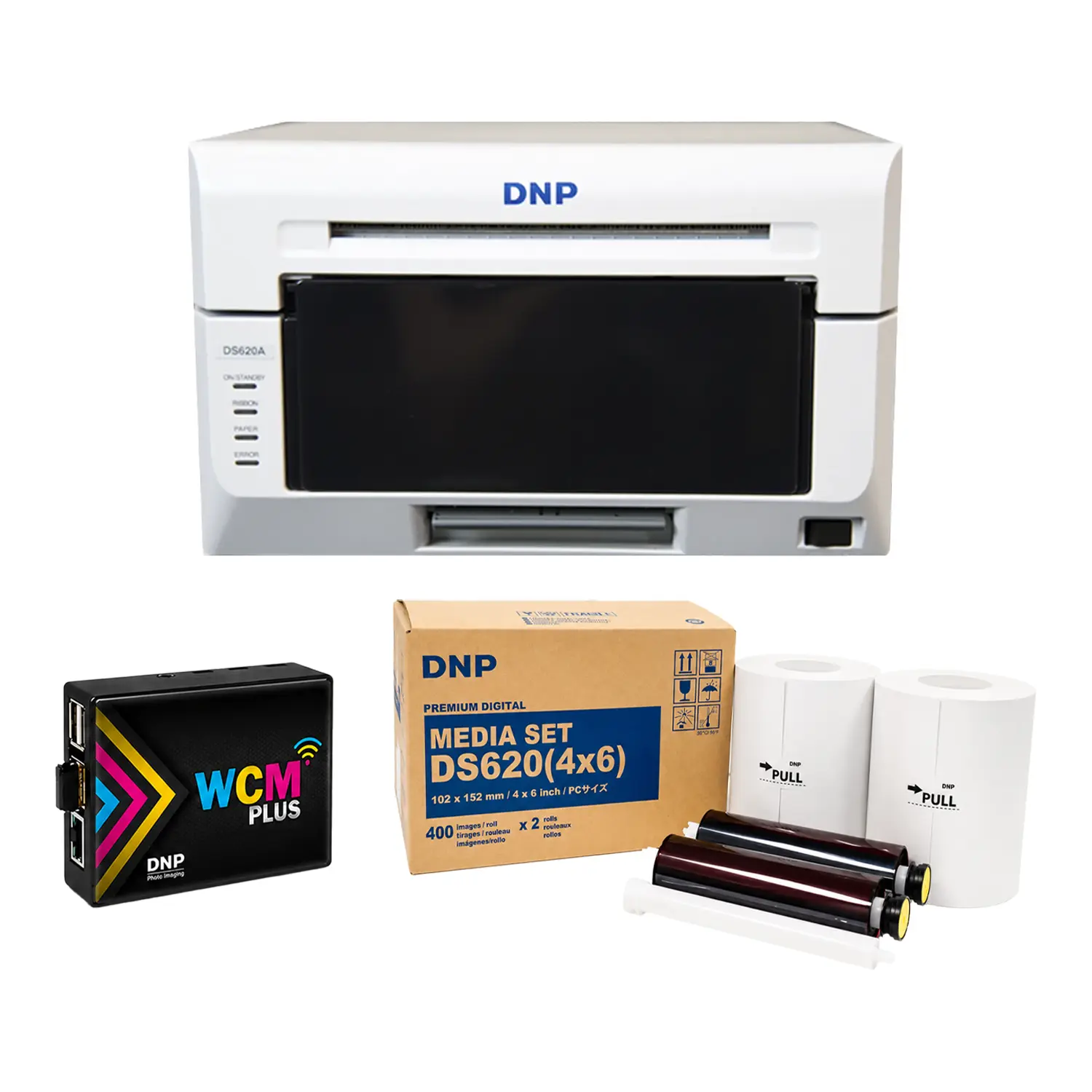
- DNP DS620A Professional Dye Sublimation Photo Printer — the printer itself, with power cord, USB cable, paper tray, output tray, and quick start guide
- DNP DS620A 4 x 6 Media Kit — 800 prints (2 rolls) — two matched paper and ribbon rolls, 400 prints per roll, glossy and matte selectable
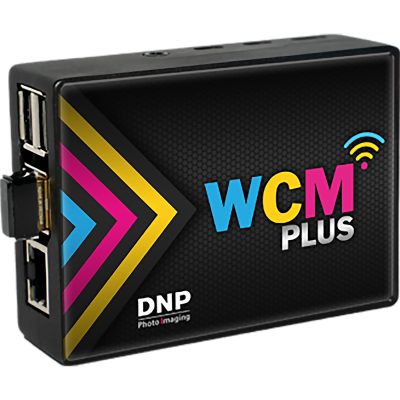
- DNP WCM-PLUS Wireless Connect Module — dual-band Wi-Fi hotspot, 3 USB ports, AirPrint support, no venue Wi-Fi required
DNP DS620A Printer — 400 Prints/hr Dye Sublimation
The DS620A is one of the most widely deployed photo booth and event printers in the US. It produces a 4 x 6 in print in 8.3 seconds — up to 400 prints per hour — and each print exits dry and smudge-proof, ready to hand directly to guests. Dye sublimation transfers color into the paper at a molecular level using heat, producing continuous-tone output with smooth gradients, no visible dots, and a built-in overcoat layer that resists fingerprints, moisture, and UV fading.
Driver-based cut modes let you switch between 2 x 6 in strips, 4 x 6 in, 5 x 7 in, and 6 x 8 in from the same roll without changing media. A rewind function reduces waste when switching sizes mid-job. For panoramic output up to 6 x 20 in, use 6 x 8 in media with DNP Hot Folder Print v2.2 software. Both glossy and matte finishes are available from the same media roll — selected through the driver, no swap required.
WCM-PLUS Wireless Connect Module — No Venue Wi-Fi Needed
The WCM-PLUS creates its own dual-band Wi-Fi hotspot (2.4GHz and 5.8GHz) that your devices connect to directly — independent of venue Wi-Fi. iPhone and iPad users print via native AirPrint with no app or driver install required. Android and Windows devices are also supported. Up to three DNP printers connect simultaneously via the module’s three USB ports, making it useful for multi-printer setups at high-volume events. The module can also connect to a venue’s local network and share that connection through its hotspot simultaneously if internet access is needed alongside printing.
4 x 6 Media Kit — 800 Prints Ready to Go
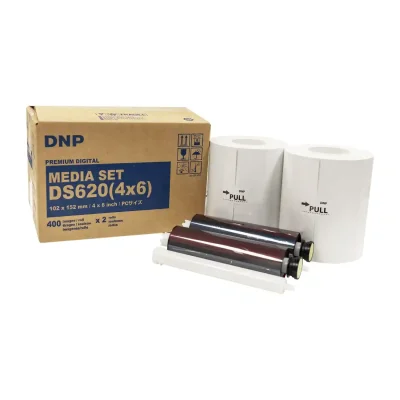
The included DNP DS620A 4 x 6 media kit contains two rolls, each rated for 400 prints, giving you 800 total prints from day one. Each roll pairs the paper and dye ribbon together as a matched set — color calibration stays consistent across the entire roll. When you need more media, the 4 x 6 kit is also available separately. For other print sizes, the 5 x 7 media kit (460 prints) is available separately.
Best uses for this bundle
- Photo booths — prints 2 x 6 in strips and 4 x 6 in from one roll; wireless module removes the need for a hardwired laptop
- Wedding and event photography — 8.3 sec turnaround keeps lines short; 800-print media kit covers most single-event volumes
- Corporate activations and brand events — consistent branded output, AirPrint from tablets, no venue IT dependency
- Retail photo kiosks — compact 10.8 x 14.4 x 6.7 in footprint; front-loading media for tight counter setups
- School portrait days and sports events — 400 prints/hr throughput handles bulk runs without slowing down the line
Bundle specifications
| Bundle SKU | DNPDS620BUNDLE |
| Printer | DNP DS620A — view individual listing |
| Media Kit | DNP DS620A 4 x 6 — 800 prints (2 rolls) — view individual listing |
| Wireless Module | DNP WCM-PLUS — view individual listing |
| Print Speed — 4 x 6 in | 8.3 sec/print — up to 400 prints/hr |
| Print Speed — 5 x 7 in | 14.1 sec/print |
| Print Speed — 6 x 8 in | 15.7 sec/print |
| Print Sizes | 2 x 6 in, 4 x 6 in, 5 x 7 in, 6 x 8 in, 6 x 14 in, 6 x 20 in panoramic |
| Finish Options | Glossy, Matte, Fine Matte — driver selectable, same media roll |
| Wireless | Dual-band 2.4GHz + 5.8GHz — AirPrint, Android, Windows, Mac |
| Connectivity | USB 2.0 (printer) + Wi-Fi via WCM-PLUS |
| Dimensions | 16 x 15 x 14 in (bundle shipping box) |
| Weight | 26 lbs |
| Warranty | 1-Year standard — 3-Year Advance Exchange available separately |
What’s included in this complete bundle?
This bundle packages three things you’d otherwise have to hunt down and buy separately: the DNP DS620A Professional Dye Sublimation Photo Printer, a 4×6 media kit with 800 total prints (two rolls of 400), and the WCM Plus Wireless Connect Module. Everything is matched and ready to work together — no extra shopping, no compatibility guesswork.
How fast does this printer actually produce a finished 4×6 photo?
A completed, dry, ready-to-hand-out 4×6 print exits the printer in approximately 8.3 seconds. That translates to up to 400 prints per hour at full pace. Unlike inkjet printing, dye sublimation prints are dry and smudge-proof the moment they come out — no waiting, no handling damage, no smeared photos handed to guests.
Why does dye sublimation produce better photos than inkjet for events?
Dye sublimation transfers color into the paper at a molecular level using heat, rather than spraying liquid ink droplets on top. The result is continuous-tone color with smooth gradients that look more like a traditional lab print — no visible dots, no bleeding, and a protective overcoat layer built into the process that guards against fingerprints, moisture, and UV fading. For event photography where prints go directly into guests’ hands, that durability matters.
What print sizes can I produce with this printer?
The DS620A handles a wide range of sizes from a single roll of media. With 4×6 media loaded (included in this bundle), you can print standard 4×6 photos or cut 2×6 photo booth strips. Swap to 5×7 or 6×8 media (sold separately) and the printer handles those sizes as well — including panoramic prints up to 6×14 and 6×20 using 6×8 media and the Windows Hot Folder Print software.
How does the wireless module work and what devices does it support?
The WCM Plus creates its own dual-band Wi-Fi hotspot (2.4GHz and 5.8GHz) that your devices connect to directly — no venue Wi-Fi dependency required. From there, iPhone and iPad users print via native AirPrint with zero apps or drivers needed. Android devices are supported through an optimized wireless workflow. Windows and Mac computers can also connect wirelessly. Multiple guests or devices can send print jobs at the same time, which makes it ideal for open-gallery events where more than one person is printing.
Do I need a laptop or computer to run this setup?
Not necessarily. With the wireless module included in this bundle, you can send prints directly from an iPhone, iPad, or Android device without any computer in the loop. This significantly simplifies your event setup — fewer cables, less table space, and no worrying about laptop battery or software crashes mid-event.
How many prints will I get from the included 4×6 media kit?
The included kit contains two rolls, each rated for 400 prints, giving you 800 total 4×6 prints ready to go from day one. Each roll contains both the paper and the dye ribbon together — they’re designed as a matched pair so color calibration stays consistent across the entire roll.
Can I switch between glossy and matte finish without changing media?
Yes. Both glossy and matte finishes are available from the same roll of media — the finish is selected through the printer driver before each job. A luster finish option is also available with updated firmware. This flexibility means you can match your output to different client preferences or event styles without stocking multiple types of media.
Is this printer compact enough to transport to events?
It was built with mobility in mind. The DS620A measures 10.8 inches wide, 14.4 inches deep, and 6.7 inches tall, and weighs about 26.4 pounds. It fits on most event tables with room to spare, and its front-loading media design means you can reload paper and ribbon in tight spaces without pulling the printer out from a tight setup.
Can I connect multiple printers to the wireless module at once?
Yes. The WCM Plus has three USB ports, allowing up to three DNP printers to connect to a single module simultaneously. This is useful for high-volume setups where you want redundancy, faster throughput across multiple stations, or the ability to offer different print sizes from different printers — all wirelessly managed from one access point.
What operating systems are compatible with the DS620A?
The printer works with Windows 10, 8, 8.1, 7, Vista, and XP in both 32-bit and 64-bit versions. A Mac OS X driver is available as a free download. The wireless module extends compatibility to iOS 14 and later, Android, and both current Mac and Windows platforms — without requiring drivers on mobile devices.
What warranty protection comes with this printer?
The DS620A carries a standard manufacturer’s warranty covering one year or 60,000 4×6 prints, whichever comes first. An optional 3-Year Advanced Exchange warranty is also available, which ships you a replacement unit before you send yours in — keeping your business running during peak season instead of waiting on repairs.
Is this bundle a good fit for a photo booth business?
It’s one of the most capable starting setups available for that use case. The printer handles 2×6 strips and 4×6 prints — the two formats photo booths use most. The wireless module removes the need for a hardwired laptop. The included 800-print media kit covers a solid first event. And the printer’s speed, compact size, and reliability hold up in the continuous-run conditions a busy booth demands.
Can multiple guests print to this printer at the same event?
Yes. When the wireless module is active, multiple devices can send print jobs simultaneously. The module queues them and manages throughput automatically, so guests don’t have to wait for one person to finish before sending their own job.
Does the wireless module work in venues with poor or no Wi-Fi?
Yes — the WCM Plus doesn’t depend on venue Wi-Fi to function. It creates its own independent hotspot that your devices connect to directly. If you also want internet access available to guests at the same time, the module can connect to the venue’s local network and share that connection through its hotspot simultaneously.
| Brand | DNP |
|---|---|
| Weight | 26 lbs |
| Dimensions | 16 × 15 × 14 in |
1 review for DNP DS620A Complete Bundle — Printer, 4 x 6 Media Kit & WCM Wireless Module
100%
0%
0%
0%
0%
1-1 of 1 review
Add a review
 DNP DS620A Complete Bundle — Printer, 4 x 6 Media Kit & WCM Wireless Module
Your review
* Review is required
Name
* Name is required
Email
* Email is required
Related Products
Original price was: $139.99.$124.99Current price is: $124.99.

Original price was: $179.00.$169.00Current price is: $169.00.
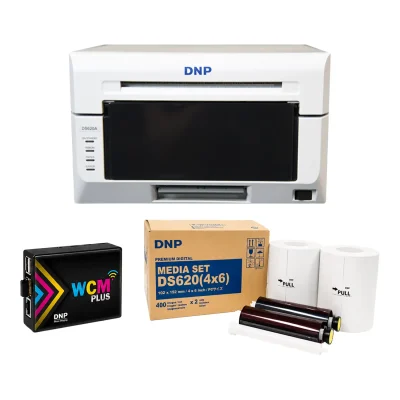
Photo Booth and Studio Printers
DNP DS620A Complete Bundle — Printer, 4 x 6 Media Kit & WCM Wireless Module
Original price was: $1,499.00.$1,349.99Current price is: $1,349.99.
DNP Supplies
Original price was: $229.00.$218.99Current price is: $218.99.
Great value and works perfectly.
I’m very happy with the DNP DS620A bundle. The price was excellent, and everything worked great right out of the box with fast shipping. The printer, 4 x 6 media kit, and WCM wireless module made it a complete and convenient setup. Highly recommended for anyone looking for a reliable photo printer bundle.