




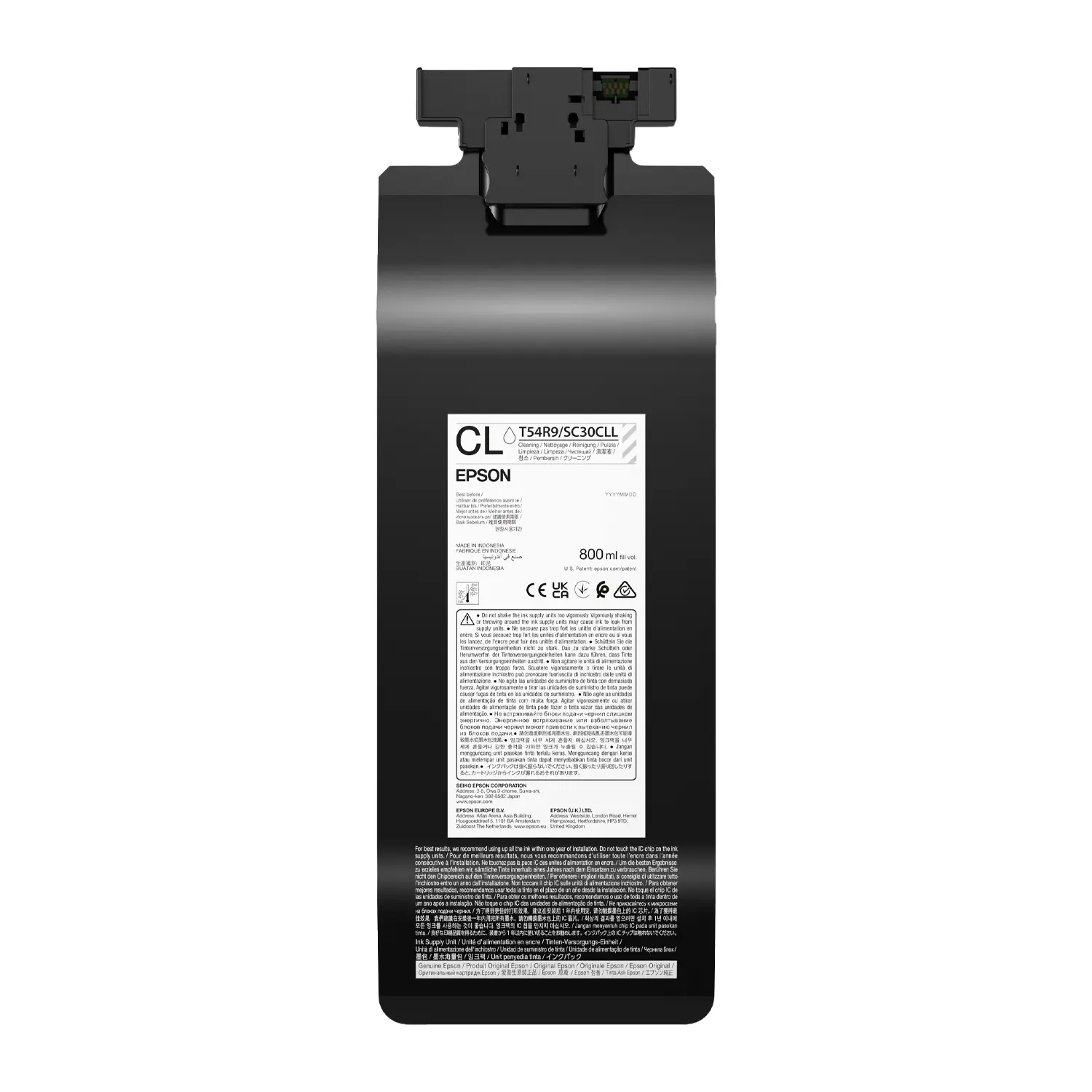

Epson T54R900 Cleaning Liquid Pack, 800 mL | F2270
$34.23
Liquid Type
- What’s Included: One genuine Epson T54R900 Cleaning Liquid Pack containing 800 mL of cleaning liquid
- Compatible Printer: Designed specifically for the Epson SureColor F2270 DTG and DTFilm hybrid printer
- Primary Uses: Required for changing printer modes and preparing the F2270 for long-term storage
- Manufacturer Part: Genuine Epson T54R900 cleaning supply made for reliable F2270 maintenance procedures
- Important: Cleaning liquid only; not T54KB20 maintenance liquid, printer ink, or manual cleaning solution
Epson T54R900 Cleaning Liquid for SureColor F2270
Epson T54R900 Cleaning Liquid is the genuine 800 mL cleaning pack made for the Epson SureColor F2270 DTG and DTFilm printer. It is used during specific printer-guided procedures, including color-mode changes and preparation for extended storage.
This is not printable ink, everyday maintenance liquid, or the bottled ink cleaning solution found in a maintenance kit. Order T54R900 only when the F2270 control panel or Epson documentation calls for a cleaning liquid pack.
What’s Included with Epson T54R900?
Each order includes one genuine Epson T54R900 Cleaning Liquid Pack containing 800 mL. The printer, ink packs, T54KB20 Maintenance Liquid, waste ink bottle, maintenance tools, and additional cleaning packs are not included.
- Package Quantity: One cleaning pack
- Pack Capacity: 800 mL
- Manufacturer Part: T54R900
- Compatible Printer: SureColor F2270
- Supply Type: Cleaning liquid
- Brand: Genuine Epson
When Does the F2270 Use a Cleaning Pack?
The SureColor F2270 uses cleaning liquid packs for defined service procedures rather than routine color printing. Epson identifies T54R900 for changing printer modes and preparing the ink system when the printer will remain powered off for an extended period.
Follow the instructions shown on the printer screen. Required quantities can change with the selected procedure and the amount of cleaning liquid remaining, so having additional packs available may prevent an interrupted process.
Changing from White Ink Mode to Color Ink Mode
Epson states that changing the F2270 from White Ink Mode to Color Ink Mode requires two cleaning liquid packs. Because this product page sells one pack, select a quantity of two when preparing for that mode change.
Color Ink Mode replaces the two White ink positions with cleaning liquid. When changing from Color Ink Mode back to White Ink Mode, Epson instead calls for two White ink packs and may require an ink charging unit for the first change.
Preparing the F2270 for Long-Term Storage
If the printer will be powered off and unused for one month or longer, Epson requires a storage-preparation procedure. The manual directs operators to gather the necessary number of cleaning ink packs and a waste ink bottle before selecting Menu > Maintenance > Keeping Preparation.
For an F2270 in White Ink Mode that will be unused for more than two weeks but less than one month, Epson directs the operator to change to Color Ink Mode. Always follow the current control-panel prompts because the required supplies depend on printer mode and remaining fluid levels.
T54R900 Cleaning Liquid vs. T54KB20 Maintenance Liquid
T54R900 and T54KB20 are separate F2270 supplies. T54R900 is the Cleaning Liquid Pack for specified mode-change and storage procedures, while T54KB20 is the Maintenance Liquid Pack used by the printer’s dedicated maintenance-liquid system.
Do not substitute one for the other. T54R900 is also different from the small bottle of ink cleaning solution used with swabs or wipes to clean designated printer parts.
Epson T54R900 Cleaning Liquid Specifications
- Brand: Epson
- MPN: T54R900
- GTIN-12: 010343976337
- Capacity: 800 mL
- Package Quantity: One pack
- Compatible Model: SureColor F2270
- Printer Workflows: DTG and DTFilm
- Supply Category: Cleaning liquid
Handling Guidance for Print Shops
Epson says Cleaning Liquid packs do not need to be shaken. If a pack has been stored in a cold location for an extended period, allow it to return to room temperature for four hours before use.
Do not touch the IC chip, dismantle the pack, refill it, or expose it to impacts. Install it only in the correct tray position and complete the guided procedure without turning off the printer or opening covers unless instructed.
Order Genuine Epson F2270 Supplies from Buffalo Imaging
Choose T54R900 when your SureColor F2270 requires an 800 mL Cleaning Liquid Pack. For normal printing supplies, shop genuine Epson T54K1 Black Ink, Epson T54KA White Ink, or browse all Epson supplies from Buffalo Imaging.
Check the procedure and required quantity before ordering. Add the number of cleaning packs your F2270 requests so your shop can complete the mode change or storage preparation without unnecessary downtime.
What is Epson T54R900?
Epson T54R900 is a genuine 800 mL Cleaning Liquid Pack for the Epson SureColor F2270 hybrid DTG and DTFilm printer. It is used during specific printer-guided procedures such as color-mode changes and long-term storage preparation.
What is included with the Epson T54R900 Cleaning Liquid Pack?
Each order contains one genuine Epson T54R900 cleaning liquid pack with an 800 mL fill volume. The printer, ink packs, T54KB20 Maintenance Liquid, waste ink bottle, maintenance tools, and additional cleaning packs are not included.
Which printer uses Epson T54R900 Cleaning Liquid?
Epson officially lists T54R900 for the SureColor F2270. No additional printer compatibility is confirmed for this listing.
How many T54R900 packs are included in one order?
One order includes one 800 mL cleaning liquid pack. Check the required procedure before ordering because some F2270 operations require two or more packs.
How many cleaning liquid packs are needed to change from White Ink Mode to Color Ink Mode?
Epson states that changing the SureColor F2270 from White Ink Mode to Color Ink Mode requires two cleaning liquid packs. Since this listing contains one pack, order a quantity of two for that procedure.
Is T54R900 used for long-term F2270 storage?
Yes. Epson directs users to install cleaning ink packs when preparing an F2270 that will be powered off and unused for one month or longer. The required quantity depends on printer mode and remaining liquid, so follow the control-panel instructions.
What should I do if the F2270 will be unused for more than two weeks?
If an F2270 in White Ink Mode will be unused for more than two weeks but less than one month, Epson directs users to change it to Color Ink Mode. For one month or longer, perform the Keeping Preparation storage procedure.
Is T54R900 the same as T54KB20 Maintenance Liquid?
No. T54R900 is a Cleaning Liquid Pack used for specified mode-change and storage procedures. T54KB20 is a separate Maintenance Liquid Pack for the printer’s maintenance-liquid system.
Is T54R900 the same as the ink cleaning solution in the maintenance kit?
No. T54R900 is a pack installed in the F2270 during guided procedures. The bottled ink cleaning solution in the maintenance kit is applied with cleaning tools only to Epson-approved printer areas.
Does Epson T54R900 need to be shaken before installation?
No. Epson says Cleaning Liquid and Maintenance Liquid packs do not need to be shaken. Follow the printer display and Epson handling instructions during installation.
Can I refill or reuse a T54R900 cleaning pack?
Do not dismantle or refill the pack. Use a genuine Epson pack, protect the IC chip and supply port, and follow Epson’s instructions for installation, removal, storage, and disposal.
What are the UPC, weight, and dimensions for Epson T54R900?
The reported UPC is 010343976337. Approximate package data is 2.21 lb and 14.96 × 5.91 × 2.17 inches. Verify these reseller-supplied package measurements against the physical item when exact shipping data is required.
| Brand | Epson |
|---|---|
| Printer Model | |
| Liquid Type | Cleaning Liquid |
| Weight | 2.21 lbs |
| Dimensions | 14.96 × 5.91 × 2.17 in |
Add a review
Epson T54R900 Cleaning Liquid Pack, 800 mL | F2270 Your review
* Review is required
Name
* Name is required
Email
* Email is required
Reviews
There are no reviews yet